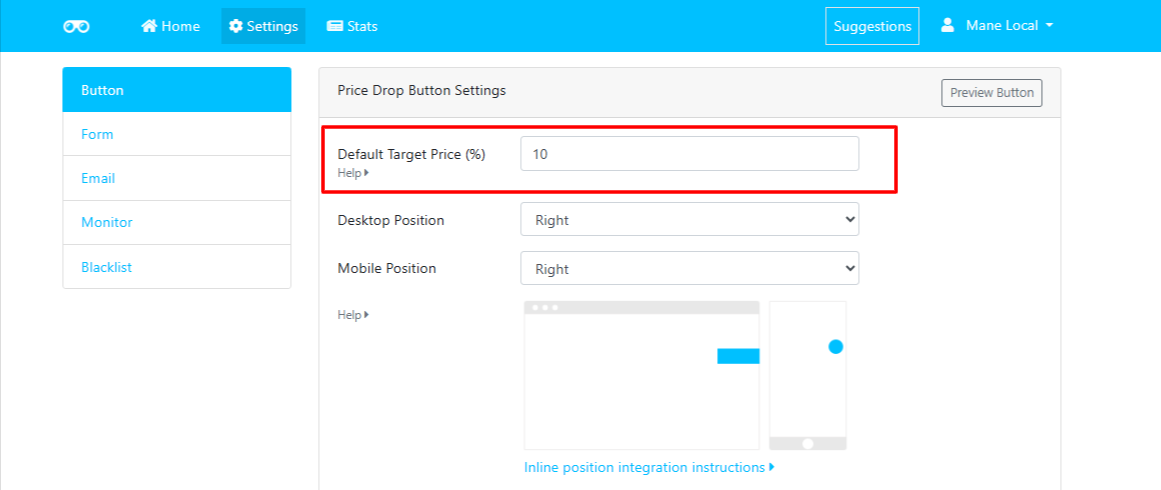
Default Target Price (%)

Rupali
Last Update 4 months ago
This setting allows store admins to define the default price drop percentage displayed when the Price Drop Alert button appears on product pages.
Store owners are no longer limited to the default value. They can now set a custom default percentage as per their requirement, say 5% or higher, by following the steps below.
- Default Value: 10%
- Calculation: The app calculates the target price as 10% lower than the product's current price.
- Example:
If the product price is $100, the default target price shown to the user will be $90.
Store owners are no longer limited to the default value. They can now set a custom default percentage as per their requirement, say 5% or higher, by following the steps below.
- Go to the Settings tab in your app.
- Select Button > Price Drop Button Settings.
- Under Default Target Price (%), enter your desired default value.
- Save your changes.